
REVOPOINT / Applications & case studies
A useful scan is not always destined for the same next step. One project may need a reference for a new attachment, another a part that can be remodelled and printed, and another a record of an object's surface.
Four community examples collected by Revopoint show those different directions with INSPIRE 2. They are individual creator projects rather than tests carried out by Creality AU, and each has a different reason for capturing the object.
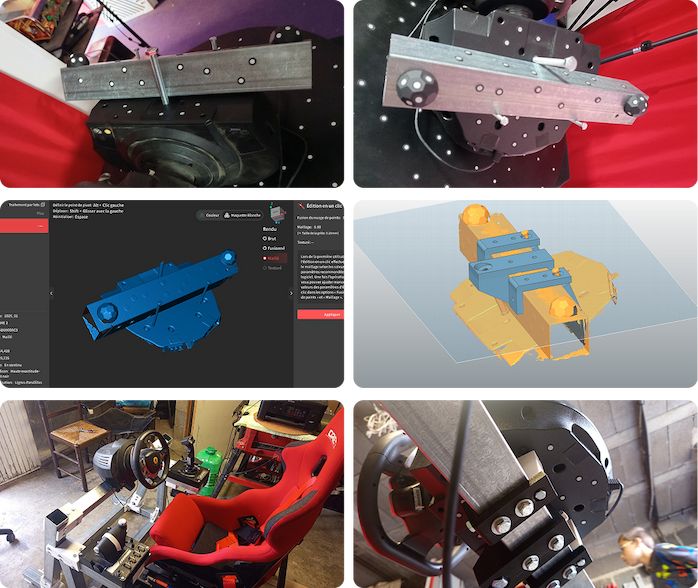
Cover: Tony Hzr captured the steering wheel and part of its bar to develop attachments in QuickSurface. Image supplied by Revopoint.
An attachment starts with the parts it must meet
Tony Hzr wanted to keep a steering wheel attached to its bar. He scanned a section of the bar together with the wheel, leaving the screws in place, then used QuickSurface to develop the attachment geometry.
The interesting choice is to capture the connected area, not just the main object in isolation. The bar and installed screws form part of the design context. In this example, scanning supplies the reference for modelling a new connection; it does not establish a load rating or certify a steering component for use.
From a captured part to a printed version

Daniele Pulimeno's reverse-engineering example follows a separate route. INSPIRE 2 captures the part through Revo Metro, after which the geometry is modelled in Fusion 360 and taken through to a printed result.
This is a helpful distinction for anyone expecting a scanner to produce finished CAD automatically. The creator's process includes a modelling stage between capture and printing. The scan contributes the physical reference, while Fusion 360 is used to build the design that moves towards the final printed object. Looking at that transition is as useful as looking at the scan alone.
Look closely at a sculpted surface

Davide Fodaro used INSPIRE 2 to capture a female bust. His shared example focuses on the point cloud and the way it records the sculpture's detail, rather than using the scan as a starting point for a mechanical replacement.
That gives the gallery a different kind of purpose. For a sculptural object, the captured surface can be the main subject of interest. The example invites a close look at the recorded form, without turning one creator's assessment into a universal promise of perfect results on every sculpture.
A metal object offers another capture challenge

Fodaro also shared a metal cornucopia captured using the parallel laser-line mode. He reported obtaining the result without preparing the object or adding assistance for that particular scan.
The important qualification is that this describes one object and one creator's experience. It is not a reason to assume every metal surface will scan under identical conditions. Together with the bust, the cornucopia broadens the gallery beyond technical parts and shows why the object and the chosen scanning approach matter.
Build your REVOPOINT workflow with Creality AU
Explore REVOPOINT INSPIRE 2 with your intended next step in mind: attachment design, reverse engineering or surface capture. These examples show different uses of the data, not software or accessories included in every scanner package.
View products and package optionsImages supplied by Revopoint and reproduced with permission. Supplier and community examples are not independent tests by Creality AU. Back to Guides & News