
REVOPOINT / Applications & case studies
Scanning a full-size vehicle and recording a narrow mechanical feature ask different things of a workflow. Overall coverage matters in one case; the shape of a tooth or thin edge becomes the focus in another.
A demonstration gallery from Revopoint brings these tasks together using Trackit SR. The four examples feature wireless capture without object markers, moving from an ATV and a bike to a cog and a thin workpiece. These are supplier demonstrations, not independent benchmark results.
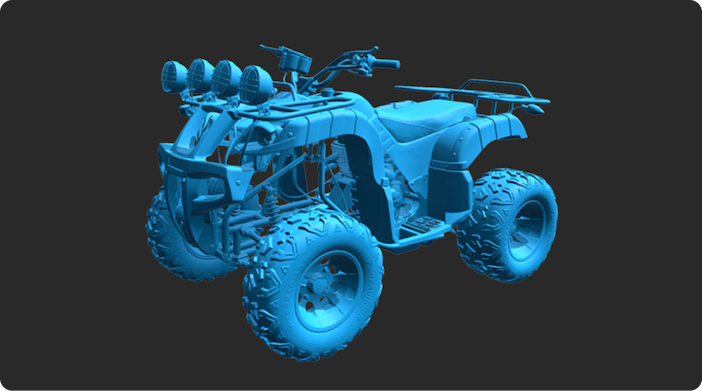
Cover: The ATV demonstration shows Trackit SR being used at full-vehicle scale. Image supplied by Revopoint.
ATV: keep the complete object in view
The ATV example presents a full-size vehicle captured wirelessly. It introduces the gallery's large-object end: the scan needs to represent a complete machine rather than a single detached component.
Revopoint identifies marker-free operation as part of the demonstration. That is the useful distinction to take from the example, without extending it into a claim that there are no positioning or setup considerations. The supplied gallery does not state a capture time, a measured coverage percentage or a dimensional test for the ATV.
Bike: work across changing shapes and finishes

The bike demonstration combines dark metal tubing, reflective parts and a more intricate overall structure. The supplier describes capturing the complete bike during one wireless session, bringing several surface and shape challenges into the same example.
A bike is a useful visual counterpoint to the ATV because much of its form is open rather than a broad continuous body. The gallery gives readers a way to see the resulting geometry across those different elements. It does not establish that every reflective component on any bike can be captured with an identical approach.
Gear cog: shift attention to repeated detail

The cog brings the focus down to mechanical geometry, particularly the repeated pattern of its teeth. Here the interest is less about the reach around a vehicle and more about the recorded form of a smaller functional feature.
Revopoint presents the cog as an example of detailed capture. The gallery is useful for seeing the shape, but no tooth-profile measurements, inspection tolerances or acceptance report accompany it. A convincing image of a gear should therefore be read as a scanning example, not certification that the part meets a manufacturing specification.
Thin workpiece: choose a mode for narrow features

For the thin workpiece, Revopoint specifically identifies single-line laser capture. The example concentrates on fine geometry and narrow sections, with no markers applied to the object.
This final object gives the gallery a useful change of scale. It also connects the subject to a stated scanning mode rather than implying that every task uses one setting. Alongside the larger examples, it shows why it is worth looking at the type of feature being captured as well as the overall size of the object.
Build your REVOPOINT workflow with Creality AU
View REVOPOINT Trackit SR for the model shown in this gallery. Wireless, marker-free capture is the shared theme; the examples do not replace a task-specific assessment of the required scan detail.
View products and package optionsImages supplied by Revopoint and reproduced with permission. Supplier and community examples are not independent tests by Creality AU. Back to Guides & News