
REVOPOINT / Applications & case studies
Once an object has been scanned, a different set of questions becomes possible. How does a print compare with its design? Which areas of a surface rise above the surrounding form? What does a manufactured component look like when examined as measurement data?
Four user stories shared by Revopoint show Revo Measure in those roles. The projects combine the software with MetroX Pro, the original Trackit and MetroY Pro. They describe users' applications, rather than certified inspection procedures or testing performed by Creality AU.
Cover: Jan Proschenski used a printed model, MetroX Pro and Revo Measure as part of a printer-calibration check. Image supplied by Revopoint.
A printed test model becomes comparison data
Jan Proschenski designed and printed a model, captured it with MetroX Pro and used Revo Measure to compare the result. He presented this as part of calibrating his 3D printer.
The important connection is between the intended model and the physical print. Scanning provides a record of what was produced, while the software supports the comparison. The supplied example does not give calibration settings or a before-and-after accuracy figure, so it should not be treated as a universal printer-calibration recipe.
A coin reveals surface differences

Davide Fodaro's cultural-heritage example uses Trackit data to examine a coin's surface form. Revo Measure's deviation view highlights a raised encrustation, while the reverse side shows a difference in level across the object rather than a perfectly flat face.
The purpose here is to understand morphology: how the surface is shaped and where it varies. The shared material also includes photographic and other model views. This is an analytical record of the object, not a claim that scanning determines the coin's age, authenticity or the appropriate conservation treatment.
A custom Fiat logo is checked against CAD

For a classic Fiat 600 project, Olly's Likes designed a logo and had it 3D printed in aluminium. A MetroY Pro scan was then imported into Revo Measure together with the CAD file to examine how the manufactured piece compared with the design.
The case gives the measurement stage a clear reference: the original CAD geometry. It is a different task from simply making a digital copy of the logo. The aim is to investigate the relationship between the designed shape and the physical result, without assuming a stated tolerance was achieved.
Machined parts provide another inspection question

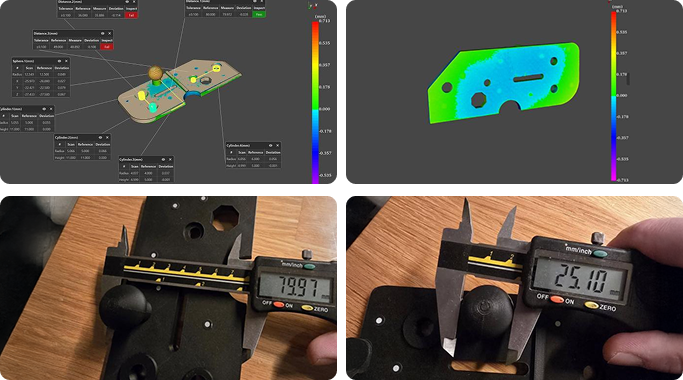
Tony Hzr explored Revo Measure with MetroY Pro for parts produced on a CNC machine. His account concerns shapes that can be difficult to assess with simpler measurement approaches, and he described the work as testing the software for that purpose.
That exploratory status matters. The example shows interest in a scan-based inspection workflow, not proof that it can replace every established measuring method. A production acceptance decision still needs a defined requirement and an appropriate measurement process; neither can be inferred from the gallery image alone.
Build your REVOPOINT workflow with Creality AU
Explore Revo Measure and the local MetroX, Trackit and MetroY listings. Software licensing and scanner editions should be checked separately rather than assumed to be included in every package.
View products and package optionsImages supplied by Revopoint and reproduced with permission. Supplier and community examples are not independent tests by Creality AU. Back to Guides & News