
REVOPOINT / Applications & case studies
Introducing 3D scanning to a classroom is partly a hardware decision and partly a workflow decision. Students need to get from a real object to usable data, while teachers need to consider how the equipment fits existing computers, lessons and shared access.
Revopoint reported Japanese demonstration sessions using MIRACO and MetroY Pro, with practical instruction provided by FULL DIMENSIONS STUDIO. These were supplier-reported activities in Japan, not workshops organised or offered by Creality AU. The examples highlight different ways to introduce scanning into practical teaching.
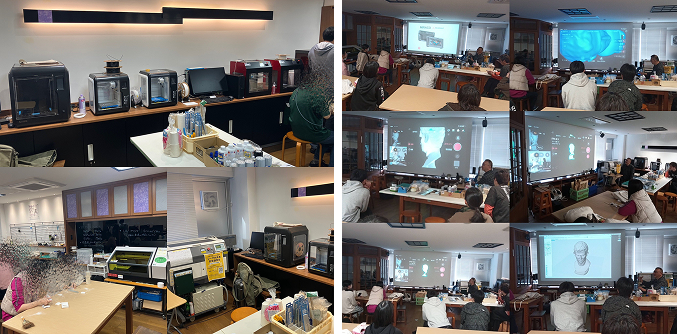
Cover: The supplier's Japanese workshops introduced scanning as part of a practical design workflow. Image supplied by Revopoint.
A first scanner at the University of Tsukuba
On 8 and 9 November 2025, a hands-on MIRACO seminar took place at a University of Tsukuba fabrication facility as part of an information-media creation lecture. The supplier's account records 13 participating students and professors at a laboratory without a 3D scanner of its own.
The group was particularly interested in MIRACO's standalone operation. Capture did not require a connected PC, giving first-time users a way to begin on the scanner itself before considering the later software stages. That was a feature of the teaching workflow, not a claim that all subsequent design work happens without a computer.
Teach the object and the next software step
The Tsukuba demonstration continued beyond capture to light editing and bringing the data into CAD and ZBrush. This made the scan part of a complete practical exercise instead of presenting it only as a finished model on screen.
The instruction emphasised choosing scanning techniques that suit the object. That is an important teaching point in the report: learning the controls is only part of the task. Students also need to understand how their approach to the physical object affects the data they will use afterwards.
Bring standalone capture into a Mac-based class

A further MIRACO demonstration took place in a Japanese design class on 12 December 2025. All the participating students used Macs, and the session included transferring data to a MacBook Pro for work in modelling software.
The example separates two useful ideas: capture on the self-contained scanner and continued work on an existing classroom computer. Students could see how a physical object entered their design workflow without treating the scanner as an isolated device. The supplier reported interest in the convenience of carrying out capture and initial work on MIRACO itself.
Consider how a class shares advanced projects

On 7 January 2026, a MetroY Pro demonstration brought a different arrangement into the discussion. Unlike MIRACO's standalone capture, MetroY Pro uses a connected PC. The report highlights saving a scan project and continuing the editing on another computer.
Faculty questions focused on how this could work for multiple students. The distinction is practical: a teaching space may need an approachable way to begin, a way to hand work between computers, or both. The workshops illustrate those needs without establishing a single best scanner for every institution.
Build your REVOPOINT workflow with Creality AU
View the local MIRACO and MetroY range listings to explore the equipment behind these examples. The classroom accounts refer specifically to MIRACO and MetroY Pro, and are not an announcement of local training availability.
View products and package optionsImages supplied by Revopoint and reproduced with permission. Supplier and community examples are not independent tests by Creality AU. Back to Guides & News