
REVOPOINT / Applications & case studies
What does standalone 3D scanning look like beyond a product specification sheet? A community showcase shared by Revopoint brings together three very different subjects: an S14 Silvia, a decorative relief in Rome and an anatomical plaster model of a hand.
Each project uses the REVOPOINT MIRACO Plus, but the subjects invite different ways of thinking about a scan. A car presents a broad overall form. An architectural relief combines a larger surface with decorative features. A smaller plaster model shifts attention towards individual shapes and contours.
MIRACO Plus combines onboard processing with touchscreen control, so standalone capture does not require a connected computer. Editing and preparing the finished model can still form a separate part of the project.
These are community projects featured by Revopoint, not tests carried out by Creality AU. They offer useful project inspiration, rather than a guarantee of the result you will achieve with a different object or setup.
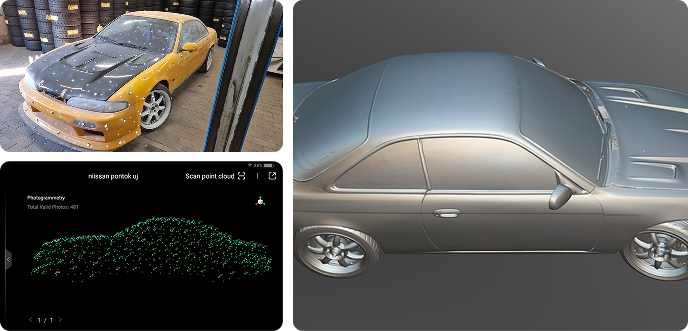
Cover image: S14 Silvia scan by Lajos Turi, featured in Revopoint's MIRACO Plus community showcase.
1. S14 Silvia: a larger automotive subject
Lajos Turi's S14 Silvia project introduces the larger end of this showcase. In the account shared by Revopoint, he describes completing post-processing of the scan data and discusses using MIRACO Plus with the photogrammetry kit.
For anyone considering automotive scanning, the useful takeaway is the workflow context: this is a project involving both capture and subsequent work on the data. The finished example should not be read as an unedited scan straight from the device.
It is also worth separating the scanner from the accessories used in a particular project. Turi's account specifically mentions the kit; it does not establish that every MIRACO Plus package or every automotive scan follows an identical setup. Check the selected product configuration against the work you have in mind.
2. Braschi Palace: architectural decoration in Rome

The next example, credited to dfodaro, is a large stucco relief at Braschi Palace in Rome. It changes the subject from a vehicle to architectural decoration while keeping the focus on a larger object.
A relief is an interesting reference for thinking about the relationship between the overall surface and the smaller forms within it. Rather than considering object size alone, it encourages a second question: which parts of the shape matter for your intended digital model?
For a project like this, plan access to the whole relief and decide which decorative details need to survive in the final model. The shared example illustrates a completed community project; it does not provide an independent dimensional test.
3. A plaster hand model: a smaller subject

Also credited to dfodaro, the anatomical plaster hand model provides a clear contrast in scale. The contributor's account describes capture in single-shot mode followed by editing in Revo Scan.
This example brings the discussion back to a compact physical object. Alongside the car and the palace relief, it shows why browsing projects with different subjects can be more useful than looking at a single showcase image in isolation.
This is a scan of an educational plaster model, not evidence of clinical or diagnostic suitability.
Explore REVOPOINT MIRACO Plus at Creality AU
Together, these examples offer three starting points for planning your own questions: the size of the subject, the features you want to capture and the work needed after scanning. They are not a substitute for checking the requirements of your particular project.
For a broader introduction, read our Revopoint 3D scanner workflow buying guide. To explore this model and the available configuration details, view the REVOPOINT MIRACO Plus at Creality AU.
View REVOPOINT MIRACO Plus packagesRead our REVOPOINT scanner buying guide →
Images supplied by Revopoint and reproduced with permission. Back to Guides & News