
REVOPOINT / 3D Scanning / Project gallery
A decorated vase, a mechanical plate, a garden sculpture and an ornamental ceiling piece ask different things of a 3D scanner. These four REVOPOINT examples show why the object is only half the decision: what you want to do with the digital result matters just as much.
All four examples below are identified by the manufacturer as RANGE 3 Pro projects. They are manufacturer-shared illustrations, not independent Creality AU tests. The source does not provide complete settings, capture times or measured tolerances.
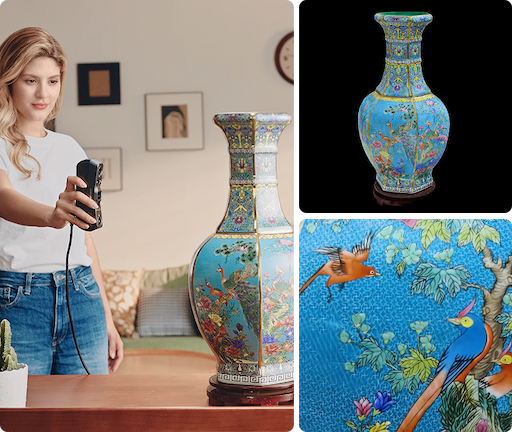
1. A vase: when appearance is the point

The vase example centres on its painted birds, flowers and colour. REVOPOINT describes this as a 3D Gaussian Splatting (3DGS) capture. For a project focused on presentation, the useful question is whether the digital view communicates the object's appearance—not simply whether its outer silhouette is recognisable.
A 3DGS visual representation should not be treated as a ready-to-print mesh or proof of dimensional accuracy. If your next step is CAD or 3D printing, check which geometry output your workflow needs.
2. An engine valve plate: look beyond the outline

The mechanical example shows a different priority: openings, recesses and the relationship between features. The blue model views help separate surface shape from colour, making this a useful illustration of geometry-led scanning.
For your own mechanical project, review both sides and inspect areas that are difficult to see. A scan can provide a design reference, but it does not by itself establish manufacturing tolerances or make a replacement component fit for service.
3. A fairy fountain: work around the object

Here the subject stays in place while the operator moves around it. The example brings the fountain's sculpted figure, bowl and pedestal into one project, rather than concentrating on a small isolated detail.
As a general planning step, check that you can move safely around the subject and see its recessed areas. This outdoor example is not a weatherproofing claim or a guarantee of results under every lighting condition.
4. A ceiling medallion: plan access to the relief

The fourth example combines a broad circular form with raised decorative detail. Notice the setup as well as the result: supporting the piece gives the operator access to the face and relief.
For a similar project, plan coverage of the edges and undercuts, then check the processed model before deciding it is complete. A digital view alone does not confirm that every hidden surface has been recorded.
Choose the workflow before the package
Need help deciding between RANGE 3 and RANGE 3 Pro? Start with our practical RANGE 3 series guide. If the goal is a printed part, follow our scan-to-print workflow for the stages after capture.
Explore REVOPOINT RANGE 3 Pro at Creality AU →
Check the local product page for current package contents and delivery information. The examples here feature RANGE 3 Pro; do not assume that every feature or accessory is included with the standard RANGE 3.