
REVOPOINT / Applications & case studies
Automotive scanning is not a single kind of job. An engine component, a wheel trim piece and an interior panel differ in shape, size and the details a user wants to record. Their finished scan images also need to be read in the context of how each was processed.
Three community examples shared by Revopoint feature MetroY Pro on those subjects. Sammie Lilly contributed the cylinder-head and wheel-cap projects, while Jermaul W shared the door-panel scan. Together, they offer a focused look at automotive capture rather than a measured comparison between scanners.
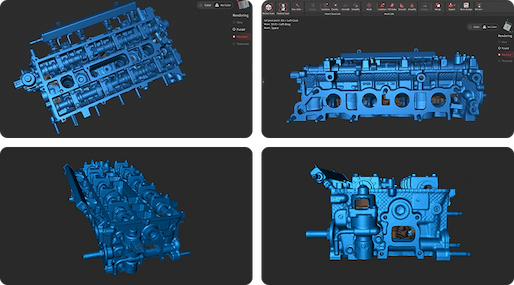
Cover: Sammie Lilly's cylinder-head example was shared without smoothing or scanning spray. Image supplied by Revopoint.
Cylinder head: preserve the processing context
Lilly's SkreetKar example records a 2.3-litre cylinder head. His short description explicitly notes that no smoothing was applied and no scanning spray was used for this particular capture.
Those details help explain what the gallery is showing. A scan displayed without smoothing is not being presented in the same way as one with a smoothing pass. The creator's report is useful context for the image, but it does not establish a dimensional tolerance or a rule that every cylinder head can be scanned with the same preparation.
Wheel centre cap: a smaller trim component

The New Edge Mustang GT wheel centre cap shifts the focus to a smaller automotive object. For this example, Lilly reports one smoothing pass and no scanning spray, keeping the processing history distinct from the cylinder-head scan.
The two contributions are a reminder to look beyond the model's outline when reading a gallery. Capture conditions and later processing both influence the displayed result. This source shows the cap's digital form; it does not document a replacement being made, fitted or approved for use on a wheel.
Door panel: a wider interior reference

Jermaul W used MetroY Pro over Wi-Fi for a door-panel scan. His account describes a smooth capture session and the use of markers, adding a broader interior subject to the two smaller component examples.
The door panel is useful because it changes the extent of the object without turning the article into a whole-car scan. It shows a user recording a larger piece of trim as a digital reference. The supplied material does not specify a completed redesign, an upholstery pattern or a production-ready replacement derived from that data.
Judge the scan against the intended next task
These examples have a shared tool but different subjects and processing notes. That makes them helpful references for the kinds of objects users are scanning, without requiring every image to demonstrate an identical workflow or result.
If the next task is modelling, fit checking or dimensional analysis, define what that task requires before judging a scan solely by its appearance. The gallery establishes successful captures reported by their creators; any later manufacturing or inspection decision needs additional evidence suited to that job.
Build your REVOPOINT workflow with Creality AU
View the REVOPOINT MetroY range to explore MetroY Pro, the model named in these three examples. Check the selected edition separately rather than assuming every series model has the same capabilities.
View products and package optionsImages supplied by Revopoint and reproduced with permission. Supplier and community examples are not independent tests by Creality AU. Back to Guides & News