
REVOPOINT / Applications & case studies
An existing object often contains the information needed to develop its replacement or plan the next restoration step. Sometimes that means recording a whole vehicle. Sometimes the important geometry is concentrated in a tiny clip or the shape of a badge.
Community examples collected by Revopoint show the MIRACO series being used across that range. Scan2Model's classic-car and household projects sit alongside Julien Mairy's chair-component redesign, demonstrating different ways to carry a physical reference into modelling or manufacturing work.
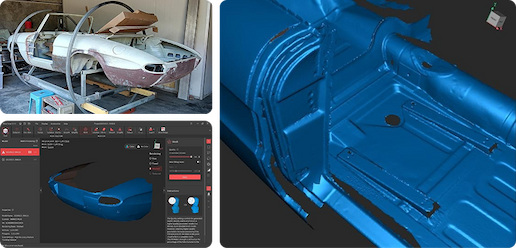
Cover: Scan2Model used the MIRACO series for initial capture during an Alfa Romeo Spider restoration. Image supplied by Revopoint.
A classic Alfa Romeo as a restoration reference
The Alfa Romeo Spider is shown on a roller frame so it can be approached from different sides. Scan2Model describes the capture as an initial stage of the restoration project, making the vehicle's existing form available digitally.
The source uses inconsistent edition wording for this particular scan, so the project is identified here at MIRACO-series level. Its useful lesson does not depend on resolving that label: the car's physical arrangement helps provide access, and scanning records the starting geometry before later restoration decisions are made.
A chrome badge becomes a manufacturing reference

For an older American car, one of Scan2Model's Rhino students needed new metal badges. A chrome-plated original was captured using MIRACO Plus with scanning spray, then brought into Rhino to develop a file intended for CNC production.
That sequence separates capture from the modelling work needed for manufacturing. It also preserves a detail of the actual case: the reflective badge was prepared for this scan. The result should not be read as proof that every chrome object can be captured without preparation or that the raw scan is automatically CNC-ready.
A dryer grille puts the clips in focus

Scan2Model's dryer project begins with removing the existing exhaust grille and scanning it with MIRACO. Particular attention went to the small clips that connect the grille to the appliance, rather than only its visible front face.
This gives the scan a clear purpose: preserve the attachment geometry as part of the reference. The supplied account does not establish a finished replacement's heat resistance or suitability for an appliance. Capturing the shape and selecting a safe material for service remain different tasks.
A chair component is redesigned for printing

Mairy scanned a Lafuma lounge-chair part with MIRACO Pro, processed the data in Revo Scan and rebuilt the design in Fusion 360. During modelling, he adjusted the component with FDM printing in mind rather than simply duplicating its captured surface.
The project illustrates how reverse engineering can include a design change rather than only copying an existing shape. The scan supplies the starting reference; the modeller decides how the new version is constructed. A redesigned chair component would still need its own suitability checks before being relied on in use.
Build your REVOPOINT workflow with Creality AU
Explore the local MIRACO range and MIRACO Plus listings for the series behind these examples. Each case uses scanning as one stage of a wider restoration or design process.
View products and package optionsImages supplied by Revopoint and reproduced with permission. Supplier and community examples are not independent tests by Creality AU. Back to Guides & News