
REVOPOINT / Applications & case studies
The size of an object is only one part of a scanning task. A broad mould, a metal cone, a small decorated bell and a skateboard each give the viewer something different to inspect in the resulting geometry.
This supplier gallery from Revopoint uses both MetroY and MetroY Pro. The individual model names are retained for each demonstration, making it possible to read the examples without assuming that every scanner in the range shares all the same capture modes.
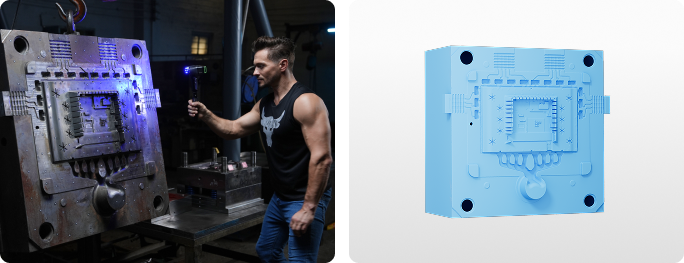
Cover: Revopoint identifies MetroY Pro as the scanner used for the large monitor-casing mould. Image supplied by Revopoint.
A monitor-casing mould at the larger end
The first subject is a monitor-casing mould listed at 1,200 mm in height. Revopoint identifies MetroY Pro as the device used to capture it, giving the collection a larger industrial form to begin with.
The scan image illustrates the mould as a digital object, but the supplied material does not document a tooling correction or an acceptance inspection. Its confirmed purpose in the gallery is to demonstrate capture. The stated object size is context for the example, not a declaration of the scanner's maximum working envelope.
A conical metal part captured with MetroY

The conical component is identified as a MetroY scan using blue-laser modes. The supplier lists the part at 200 mm high, bringing the gallery down from the larger mould to an individual metal component.
This model attribution matters: the example belongs to the base MetroY rather than automatically to MetroY Pro. It supports a focused look at the captured shape without borrowing other editions' modes or turning a visual demonstration into a dimensional test. The source does not provide a comparison against the part's engineering drawing.
A small bell brings decorative features into view

The ornate metal bell is listed at 50 mm in height and was captured with MetroY Pro. Its small scale and decorated surface provide a different subject from either of the preceding industrial forms.
The useful comparison is between object types, not an assertion that one scan proves performance on every miniature. Here the image lets readers inspect the recorded ornamental form. The supplier does not state that the bell was reproduced, restored or checked against a specified tolerance after scanning.
A skateboard returns to a longer everyday object

The skateboard rounds out the gallery with a subject listed at 1,000 mm. Revopoint attributes this capture to MetroY's blue-laser modes, returning to the base model for an object with a very different overall form.
Taken together, the four demonstrations are a useful starting point for thinking about the range of objects a workflow may encounter. Keep the individual model labels alongside the images, then judge any proposed application by the data and downstream work it requires rather than by object size alone. This keeps the visual examples connected to the actual question a project needs to answer.
Build your REVOPOINT workflow with Creality AU
Explore REVOPOINT MetroY and MetroY Pro in the local range. Check the selected model's capabilities rather than applying one edition's specifications to the whole series.
View products and package optionsImages supplied by Revopoint and reproduced with permission. Supplier and community examples are not independent tests by Creality AU. Back to Guides & News