
REVOPOINT / Applications & case studies
In a creative build, scanning can do more than reproduce the outside of a sculpture. It can help the maker understand the spaces between existing pieces and develop the shapes that connect them. That makes it a practical modelling reference as well as a recording tool.
A Revopoint-supplied case describes artwork made by Tsuchirin, known as @tsucchiii0901, for the France Pavilion at Osaka Expo 2025. The exhibition ran from 13 April to 13 October 2025, so this is a historical project account rather than an invitation to a current event.
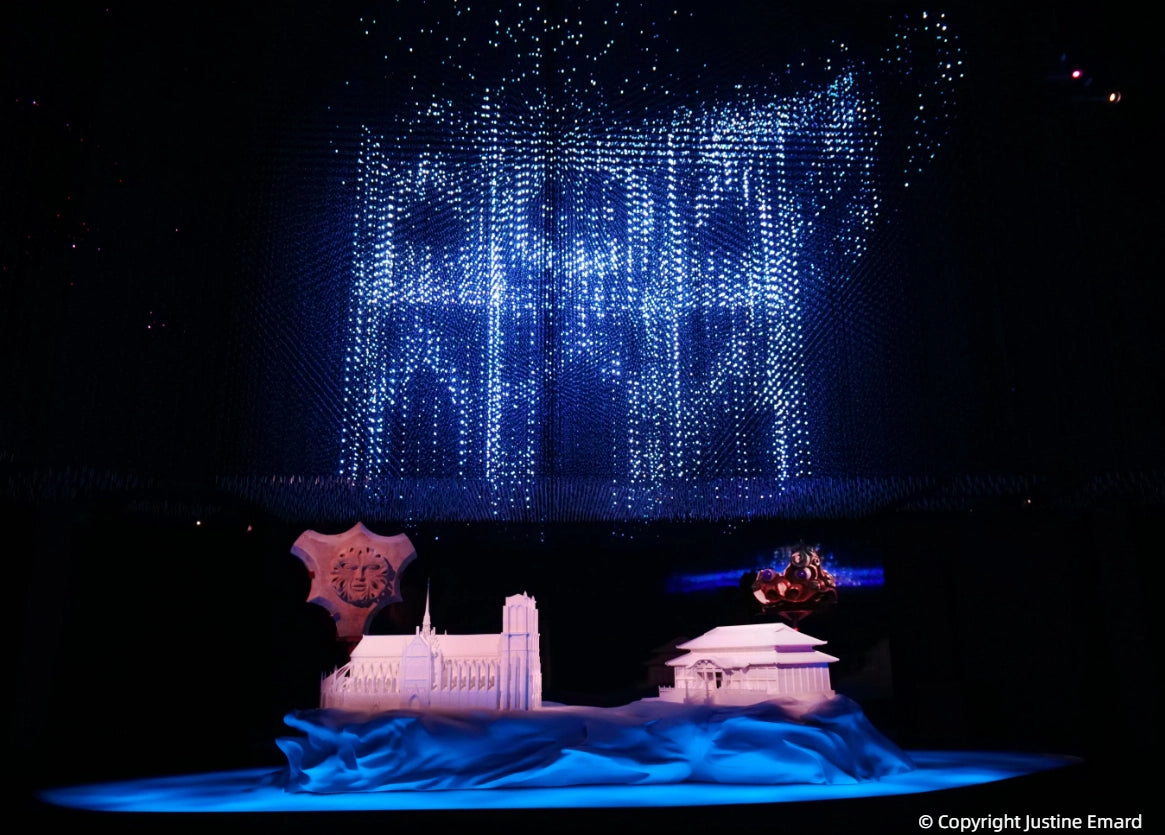
Cover: The supplier describes MetroX and MIRACO in the 2025 France Pavilion project. Image supplied by Revopoint; © Justine Emard, as credited in the image.
Use existing pieces to inform spatial modelling
Tsuchirin described using scans to take measurements for the gaps between parts during 3D-printing work. MetroX and MIRACO were the main scanners identified in the account, supporting the spatial-modelling stage of the project.
That is a more specific role than saying the scanner simply made the artwork. The captured information helped the creator understand how components related to one another. The resulting modelling and printing remained part of the maker's wider process, with no claim that scanning replaced the creative work.
Connect several landmarks in one artwork

The supplier describes a piece bringing together references to Notre-Dame Cathedral and Mont-Saint-Michel alongside Japan's Itsukushima Shrine and Shuri Castle. The landmarks from Japan and France formed part of its theme of connections between the two countries.
For a reader planning an original sculptural build, the practical interest lies in assembling a coherent physical composition from multiple elements. The source links scanning to measuring and modelling those relationships. It does not establish that the artist personally scanned the full-size historic landmarks or generated the entire exhibition piece from those scans.
Apply the idea to original figures and props

Revopoint's separate figure-scanning guide describes capturing a physical figure, processing the digital result and using it in later editing or reproduction work. For an artist's own sculpt or an object cleared for that purpose, the scan can provide a reference for developing another version.
A captured surface is not automatically the final production file. Processing, edits and checks are still needed for the intended output. Nor should one assume that every fine texture will be preserved perfectly: the object, capture method and required result all matter.
A smaller community example by Gene Rappuhn uses MIRACO to capture a decorative Santa workshop scene. His account mentions trimming its base and filling holes to prepare the display model. It is a useful reminder to keep the original capture and review any cleanup carefully: a flat presentation base is an intentional edit, not part of the original object's recorded shape.
Start with an object you are entitled to reproduce
For figures and collectible objects, owning a physical item should not be treated as automatic permission to copy or distribute its design. Keep the project to your own work or objects for which the necessary reproduction permission has been obtained.
The Expo case is useful precisely because it keeps the creator and the project purpose visible. Scanning supports a creative decision about form and space; it is not a shortcut around authorship, permission or the practical checks required before making a new physical version.
Build your REVOPOINT workflow with Creality AU
Explore the local MetroX range and MIRACO range for the scanner families behind the historical project. The case specifically names original MetroX and MIRACO, not later editions.
View products and package optionsImages supplied by Revopoint and reproduced with permission. Supplier and community examples are not independent tests by Creality AU. Back to Guides & News