
REVOPOINT / Product & software guides
The best scan format is the one that carries the information your next application needs. Choosing an extension is not a way to improve an incomplete capture, and a successful export does not tell you whether the recipient can use it.
Before exporting, ask two questions: what work happens next, and does that work need shape alone or surface appearance as well?
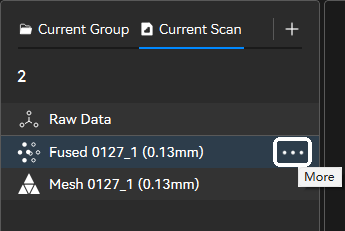
Featured image: The official Revo Scan 6 example distinguishes raw, fused and mesh entries. Check which stage you are exporting before choosing a format.
1. Identify the kind of data you are handing over

A point cloud contains spatial samples. A mesh connects vertices into faces. A textured model combines a surface with appearance information.
Keep the source project separately from the delivery export. If someone later asks for another view, less cleanup or a different output, returning to the project is more practical than treating one exported file as your only record. Confirm what the recipient actually wants before doing extra processing.
2. Use STL when the required output is shape
STL describes a triangulated surface; it is not a colour-texture delivery format. It can suit a geometry-only handover when the destination application accepts it.
For a printing job, ask which file the slicer or service requires rather than assuming every service follows the same workflow. For a visual presentation, decide whether losing the painted or printed surface appearance would remove information the viewer needs.
3. Keep a textured OBJ export together
A textured OBJ export can include an OBJ geometry file, an MTL material file and JPG texture images. Treat these as a bundle, not interchangeable copies of the model.
Place the exported files in one clearly labelled delivery folder. Avoid renaming individual files after export. Before sending, test a copy of that complete folder rather than opening only the OBJ from its original working location. This is a useful handover check when the recipient is not using your computer.
4. Check what a PLY actually contains
PLY may contain a point cloud or a polygon mesh. The extension alone therefore does not establish which representation has been supplied.
Ask for the required data type as well as the extension. A recipient expecting a mesh needs more detail than a request for a PLY file provides. For CAD work, explain whether the scan is a reference for reconstruction: changing the export format does not promise editable design features.
5. Test the file where it will be used

Check the export options in your exact application version and processing stage. Do not borrow a format list from another scanner, platform or software release. Make a small trial handover before committing to a large project.
Before handover, open the delivered file in the destination software and compare its displayed size with a known measurement. Confirm the import-unit choice rather than correcting an unexplained size mismatch by eye. This checks the handover scale; it does not validate scanner accuracy.
Delivery checklist
- Correct object and revision
- Agreed format and data type
- Complete texture bundle where needed
- Size checked in the receiving application
- Source project retained
Build your REVOPOINT workflow with Creality AU
Continue with our scan-to-print workflow or scan-to-CAD guide. Explore REVOPOINT POP 4 for your capture setup, or review Revo Design when planning reconstruction, checking the required edition separately.
View product and package optionsTechnical references
Software illustrations are from Revopoint documentation; product diagrams are supplied by Revopoint. Interface details may vary with the installed version.