
REVOPOINT / Applications & case studies
These three examples come from Revopoint's community emails dated 27 June and 12 July 2024. They are historical accounts attributed to their creators, not a new-product announcement or independent testing by Creality AU.
Each is explicitly associated with the original MIRACO in the source narrative. Together, they show different reasons to record physical geometry, while leaving unreported project details and performance outcomes unclaimed.
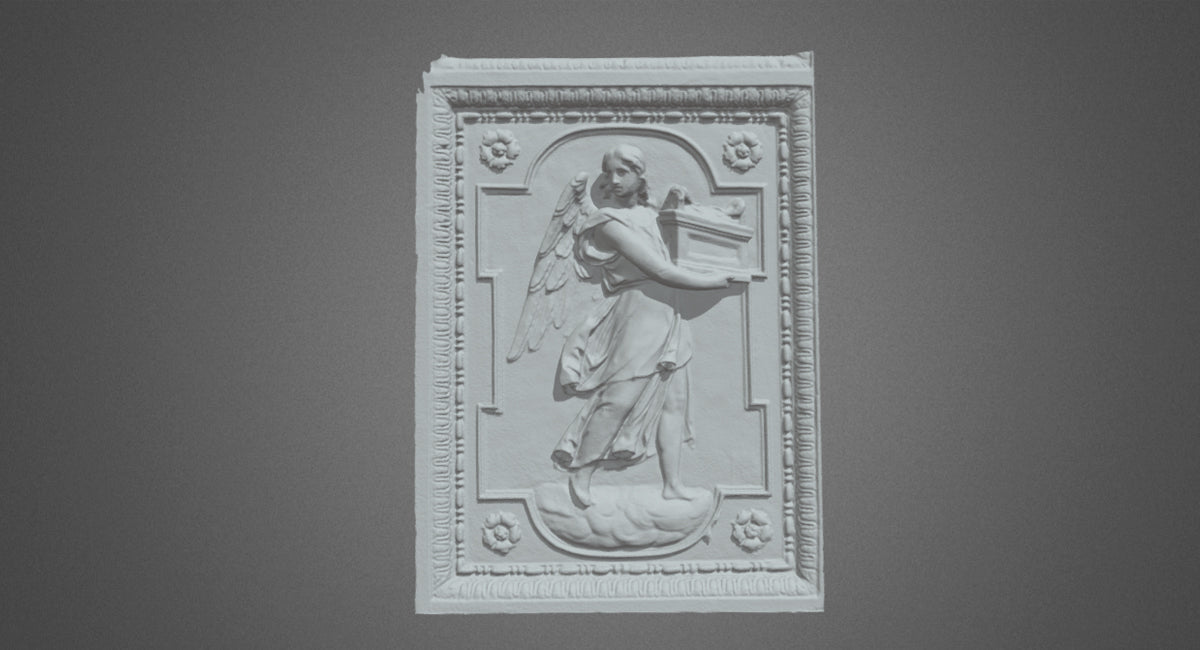
Featured image: San Bartolomeo all'isola, Rome. MIRACO scan credited to @Dfodaro in Revopoint's 27 June 2024 community email.
1. A Roman stucco relief, credited to @Dfodaro
The June email identifies this bas-relief as being at San Bartolomeo all'isola in Rome. It credits @Dfodaro with capturing the artwork using MIRACO, presenting the result as a heritage-documentation example.
The image records a raised figure and its surrounding decorative frame. The source does not describe a restoration treatment or publish an inspection report. For heritage work of your own, obtain the relevant permissions and handling guidance; scanning is not permission to alter an historic surface.
2. Complex geometry, credited to @Pail3d

The July email attributes another MIRACO capture to @Pail3d. The creator reports using Far-mode capture and no scanning spray for that example. The published image shows the recorded geometry, but the accompanying text does not name the object.
That limit is worth retaining. The example can illustrate a creator's experience without assigning a component identity, claiming a completed redesign or turning one spray-free session into advice that every surface needs no preparation.
3. A bumper example, credited to @Ash

The same July source identifies @Ash's car-bumper model as a MIRACO Far-mode scan, followed by the editing function then called One-tap Edit. The example also illustrates our MIRACO Near/Far guide.
Read that processing description as part of a 2024 account rather than current button-by-button instructions. A processed bumper mesh may provide a design reference, but this source does not establish editable CAD, verified fit or manufacturing readiness.
Build your REVOPOINT workflow with Creality AU
Explore the local REVOPOINT MIRACO range for the scanner family named in these accounts, and match the selected package to your own subjects and workflow.
View product and package optionsCommunity sources and software
Community cases adapted from Revopoint supplier emails dated 27 June and 12 July 2024; creators are credited beside their images. The download link is a software resource, not evidence for the case histories. Images reproduced with permission. These are not independent tests by Creality AU.