
REVOPOINT / Applications & case studies
For a custom automotive business, the job does not finish when a recognisable scan appears. The existing part must inform a design, the customer must try a prototype, and the feedback must reach the next revision. Those connections give the captured geometry a practical purpose.
Revopoint's profile of Skreetkar3D founder Sammie Lilly describes that wider workflow. His work grew from modifying and racing cars into a business serving Ford Performance applications. This case follows the original MIRACO named in that account, not a later scanner used in another component gallery.
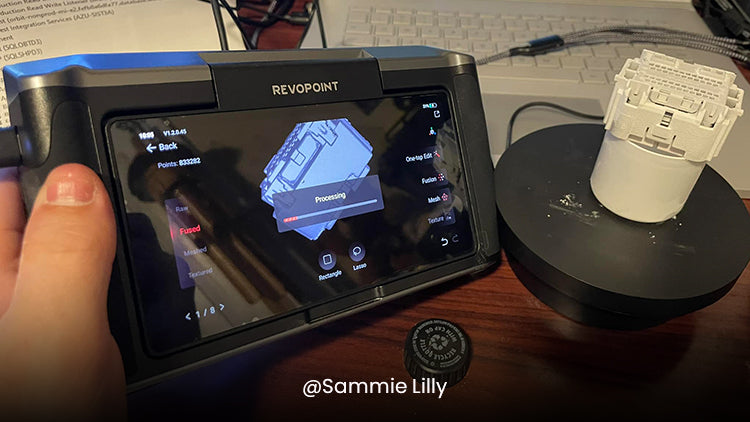
Featured image: MIRACO processing a captured component in the Skreetkar3D project. Image credit: Sammie Lilly, via Revopoint.
1. Begin with the customer's design problem

Lilly's earlier approach relied on hand measurements to support CAD work. In the supplier's account, complex curves were difficult to represent this way, while a flexible part resting on a bench could differ from its installed shape. More measurements did not necessarily resolve those differences.
The project therefore starts with understanding what the customer needs and which existing geometry the new design must accommodate. Scanning becomes a way to collect that reference rather than a substitute for defining the job.
2. Capture a reference with the original MIRACO
The account identifies the original MIRACO as a device Lilly often selected for his typical projects. After capture, he creates a mesh that carries the recorded surface into the next software stage.
Lilly describes having digital reference data available instead of repeatedly returning to manual measurements. That is his reported working experience, not an independently timed comparison or a promise that a future project will need fewer revisions.
3. Reconstruct before developing the new design

The mesh then moves into a reverse-engineering stage using tools such as Geomagic DesignX or QuickSurface. Lilly continues the design in Fusion 360 after that reconstruction work. The sequence distinguishes recorded surface data from the design geometry he needs to edit.
These software names explain the reported process. They are not a statement that the licences accompany MIRACO, or that Creality AU sells those particular applications. Nor does a processed mesh automatically contain the design intent or editable features required for a new part.
4. Put a physical prototype in front of the customer
Skreetkar3D produces test prints for customers to try against the real installation. The account places this feedback between digital design and final production, making the customer's fit assessment part of the development loop rather than an afterthought.
The useful business lesson is the handover between stages: requirements guide capture, the scan informs modelling, and a physical trial informs the next decision. A customer accepting a fit does not establish thermal performance, durability or suitability for every operating condition; those remain separate requirements.
5. Treat the workflow as a skill to develop
Lilly also emphasises continued practice. Owning and regularly using the equipment gave him opportunities to refine his approach, rather than expecting the first scan to resolve every problem. The case is as much about building a repeatable working process as acquiring a device.
For another workshop, the transferable idea is to keep the design question and feedback route visible. Scanning supports that process, while modelling choices, prototype checks and final engineering decisions still need deliberate attention. The supplier's story does not provide a verified profit increase or a general return-on-investment figure.
Build your REVOPOINT workflow with Creality AU
Explore the local REVOPOINT MIRACO range for the original model family behind this case. Plan the reconstruction tools and customer prototype checks alongside capture, checking the selected scanner edition separately.
View product and package optionsTechnical references
Images supplied by Revopoint and reproduced with permission. Project photographs and creator accounts are supplier-shared examples, not independent tests by Creality AU. Confirm the exact model and package for your own setup.